Build it in the room. Keep the question on the wall.
You can now turn an idea into a screen, an email or a role-play before the coffee’s cold. The risk is forgetting what the prototype was for.
What changed
A design sprint used to give Thursday to prototyping. One day, one prototype, built by the designer while everyone else wrote the test script. The team saw it on Friday morning.
In a HyperSprint we build several on day two, in the room, with the team watching. That’s better in most ways. The team directs the thing. They see three routes instead of one. But a prototype that appears in twenty minutes is a very persuasive object, and rooms fall in love with it. Within half an hour the conversation is about button labels and the question the prototype was meant to answer has quietly left.
The skill
Build live, and keep the original question in view the whole time. Literally in view. A sticky note above the screen that says what this prototype has to help you find out. Every revision the group asks for gets checked against it. “Does that change help us answer the question, or does it just make it nicer?”
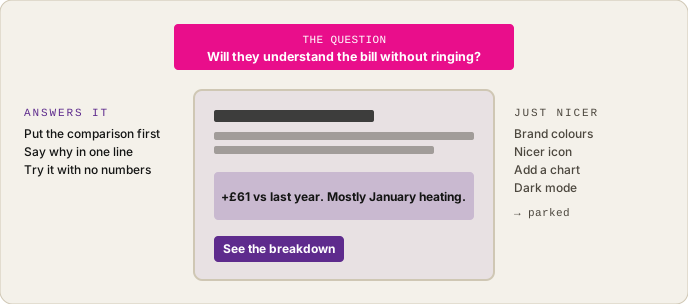
Fig. 6 — The question stays pinned above the screen. Revision requests get sorted before they get built.
Three formats we build in the room, depending on the idea:
- A screen or two. The model builds a clickable page from the brief and a sketch. Fifteen minutes to first version. Good for anything a customer would see.
- An email or letter sequence. Three messages, written and formatted. Ten minutes. Good for anything about timing, tone or “would they even open it”.
- A role-play script. The model drafts what the call handler says and what the customer might say back. Two people in the room act it out. Twenty minutes. Good for anything involving a conversation, and the one teams forget exists.
In the high-bill sprint we built all three for the “call first” idea: a screen for the handler, the letter that follows the call, and the script. The role-play was the one that changed the design. Hearing a colleague play a confused customer for four minutes told us more than the screen did.
What goes wrong
The group directs the person with the keyboard, and the person with the keyboard starts to direct the group. “I could add a chart here.” “What if it had a progress bar?” The prototype grows features the question never asked for, and each one takes two minutes, so nobody objects. An hour later it’s a product demo. We now give the keyboard person a rule: you build what’s asked, you don’t suggest.
The other one is polish. A prototype that looks finished gets tested as a finished thing; customers comment on the colours. A prototype that looks slightly rough gets tested as an idea. Rough on purpose. Grey boxes are fine.
Run it Monday
- Before building, write the question the prototype answers on a sticky note. Pin it above the screen.
- Pick the format by the question, not by habit. Conversations get role-plays.
- Two columns on the wall: “answers the question” and “just nicer”. Every revision request goes in one before it’s built.
- The keyboard person builds; they don’t suggest. Rotate them (Day 9).
- Stop at rough. If someone says “it looks great”, you’ve gone too far.
The prototype is a question with a screen on it. Lose the question and you’ve just got a screen.
The three prototype prompts, screen, email sequence and role-play, with the timeboxes for each, are in the facilitation deck.